Back in April, when my paid Claude / ChatGPT subscription started to hit limits more often than I wanted that to happen, I somehow thought “and why don’t I try to host it all myself”. After all, how difficult could it be… just set up a server, write relatively simple software, and ditch those subscriptions. I even blogged about those early experiments: https://www.itaintboring.com/ai/custom-cua-with-deepseek-and-o4-mini-why-not/
About 6-7 months later, lots of time spent, and I now have the biggest piece of “software” I have ever written for my own needs. Because, you see, I don’t even know if anyone would ever be interested in using it. But the advantage is that I know how most of the pieces there work, and I can try/change things as and when I wish. Which of course is a burden, too, since I’m still discovering new things, and right now I’m actually tempted to re-write some of the pieces for better architecture, but… now that it finally works, do I really need to?
I asked Chat GPT for an opinion on this post, and it called it a “field report”. That actually makes sense, so possibly treat it that way. You can also treat it as an example of what happens when one goes down the rabbit hole of infinite exploration. Would I have done it if I knew? Sometimes, it’s better not to know.
Here is what I’m talking about, though:
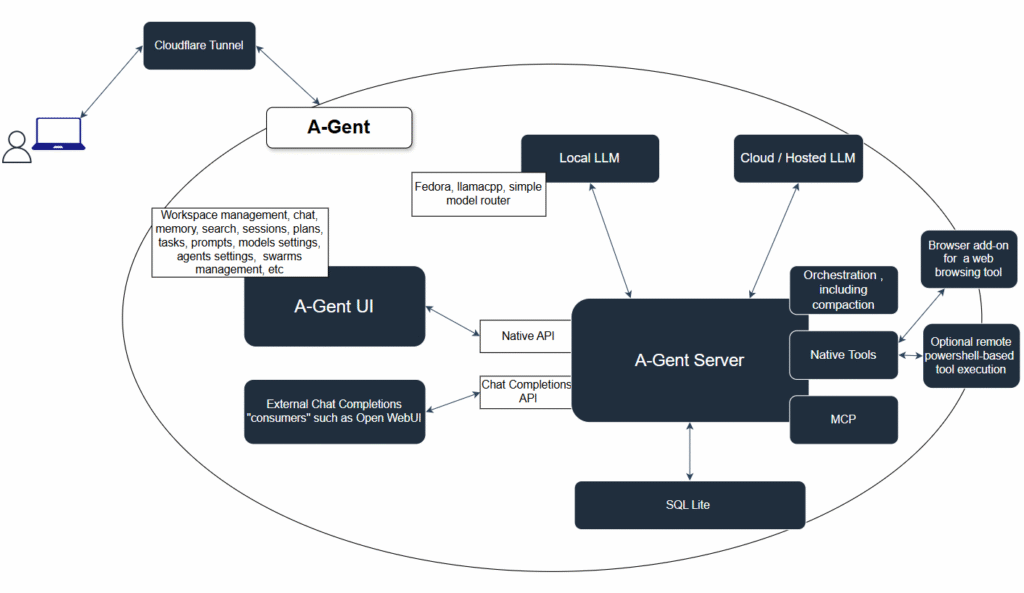
For the sake of organizing my own understanding of how all of this works (not the architecture above, but everything that I learned), and, also, perhaps to show off a little, I am going to spend some time now to blog about what I ended up with, at least so far. This work never stops to be honest- LLM-s are evolving, enhancements to the LLM hosting frameworks are being shipped all the time, your hardware requirements change, there are bugs in the software, etc etc. Tinkering with all of this is fun, annoying, and revealing all at the same time.
Am I going to share the source though? Possibly, I’m not sure. I need to clean it up a bit first, but, more importantly, I don’t necessarily want to take on the role of git project “maintainer” on the off chance people would decide to start using this.
For I’ll just start with a somewhat random set of facts which I have discovered while working on this, and I’ll spend more time in the subsequent posts digging into all of this.
Agents are great in writing code, but they forget, and you have to remember
There is, probably, not a single “consumer” agent out there that can actually remember everything about a coding project. Humans, on the other hand, “almost” can, at least in comparison.
Hosted API tokens are expensive, and the costs start accumulating fast. You don’t need to worry that much about speed/memory, though.
I mean that’s something we all know by now, but I just know it by heart at this point. I also know that
Local LLM tokens are cheap in comparison, but you have to optimize for the speed/memory
GPU-s have limited memory. They also have different memory – some are faster than others. But it is not all about the memory speed, there is, also, what is called a KV Cache for example. A large continuous chat session may be working just fine because most of it is cached, but a similarly large single request for which there is no cache yet can take a lot of time to get processed. Why?
Prefill performance is not the same as decode performance
There are two main phases in the prompt processing. There is pre-fill. And there is decode. They are affected differently by the total memory, by the memory bandwidth, GPU architecture, CPU cores, CPU memory, PCI speed, etc. Before you see the first token in the output, for example, the whole request (including the system prompt, use prompts, tool descriptions, etc) has to go through the prefill stage. Which is where it becomes really fast if there is KV cache, and it can take forever if there is no such cache. Cloud providers have immense advantage at this stage because of the infrastructure optimizations. Local LLM… works fine for a single user, and what happens when there are multiple users really depends on your hardware and software setup. It is worth mentioning that “faster” setup costs more, apparently.
And, then, you need some sort of harness around your agent/llm
Tools, mcp hosting, memory management, compaction, etc etc. LLM-s are just text processors – you give them instructions, they respond with some text output. You need a harness to process that text output, to manage the whole conversation, and, possibly, to do any number of other things
Speaking of which, how do you actually managet large context when hosting locally?
I tried a bunch of approaches. This is not conclusive at all, this is just what worked for me. Summarization breaks KV cache. It kind of works, but, if you summarize the head portion of the conversation, your next request will be slow at prefill. And, besides, it is not always worth it. Apparently in the agentic workflows tool calls is where most of the tokens are. Your agent reads a large file, and your token consumption jumps. So it’s easy to think “let’s trim those calls” after a while. Sure, but you can confuse the model by removing some tool calls from the history. You can summarize, but, then, it’s extra calls to the same or other llm, and it’s a slowdown. Long story short… Surprisingly, it seems it also works if you just ask the model to dump “current state” somewhere, including the goals etc, then reset the session and ask the model to re-read the state and continue.
Problem is, you may want to see the history yourself. I’ll get into that in more details later, right now it’s here just to provide an outline of the problem.
What is a large context window, btw?
Oh, that depends. One way to look at it is from the memory perspective. Are you using modern models that have optimized kv cache? Great you are in luck, the context window might not take that much memory. If you decide to use an older model, you context window might suddenly jump, and you’ll be out of memory.
Another thing to consider is performance. Are you using a dense model? Or is it an MoE? A 3B active, 35B total parameter MoE can work faster than a 27B dense model on the same size context, simply because it has far fewer parameters to process for each token. So, in practical terms, it may be the same context size and the same memory consumption, but it may not be usable in one case and totally fine in another.
Then of course you can use a quantized model. The model may start suffering from certain quality loss, but, suprisingly, it’s not that bad. q4_k_m quantization can still do wonders, and there are others now.
You need a framework / engine for model hosting
As in, you might not want to get into the business of writing that inference code yourself. But, then, unless you have an NVIDIA card, you are in for some fun. NVIDIA’s CUDA is a well-supported “standard”. AMD ROCm, is, likely, the next good option. What about Intel? It’s geting better, but it’s new… And if it were just that. Different GPU-s have different architecture, so you can get V100 with 32 GB, and, presumably, it’ll be fast. But it won’t support flash attention on llamacpp (I’m not sure if I’m generalizing, there may be custom builds), so kv cache will need more memory.
Different frameworks do now support all the same quantized formats.
Different frameworks respond differently to single/multi user scenarios.
Etc.
And what about the API stack?
It is only getting more interesting. Chat completions vs Responses vs Anthropic… those are different api-s, as if those companies could not agree on the single protocol… which of course they couldn’t.
And then there are external tools such as Open WebUI
Do you want your “harness” to work with those? Thats just a few days of work really, though I should have said nights… and more like a week or two
Did I mention the hardware?
I did mention the gpu, but… keep in mind that, unless you have xeon or threadripper which are way more expensive, you are limited to 1 or two pci slots for your gpu. But you may need bifurcation, and that’s, usually amd, and, usually, that’s more expensive. What do you choose if you don’t know what’s going to to work?
Also, DDR5 is, well, twice as expensive as DDR4… but, of course, ddr4 means older motherboards and older cpu. And Google will tell you those cheaper options are not the best, so… when it turns out they actually work fine, you’d be surprised and relieved at the same time… and you know the craziest thing? Pci3 x1 works with intel arc b60. I tried just out of curiosity. It may be slower, but it depends on your workload and memory. Getting that model into the gpu memory over a PCI x1 slot can take somewhat longer… if the model does not fit, you will keep paying that extra price all the time while working with the model… but, if it fits… you don’t need that much of a bandwidth once it’s there. Well unless you are going to use that hardware for model training, which I am not going to do.
What about all the algorythms and optimizations?
AST trees, summarization, advanced mcp-s… all are great, but, somehow, the absolute best option for me turned out to be the old good “look at the files” approach. The model decides what to do: read a file, search in the files, look at the folders, etc. It probably depends on what you are trying to achieve, and, with all those brute force file access tools, you need to manage compaction somehow (or you’ll be paying the API price while in the cloud, yet you won’t be able to fit the context into your GPU memory when running the model locally)
Other things worth mentioning
– GPU prices just keep going up. Intel was one of the cheaper option, and it just raised prices by about 30%
– AI MAX 395 looks great on paper, but that large memory does not automatically translate into fast performance, since the memory is, actually, slow. That said, prices are not going down either.
– DDR5 is about twice as expensive as DDR4. You don’t necesserily need DDR5. You don’t necesserily need bifurcation. You don’t necessarily need multiple x16 or even x8 slots. Don’t listen to everything google will tell you – challenge it. A lot of those hardware recommendations are tailored towards “model training” (or, perhaps, “model does not fit in memory”) scenarios
– It is not that easy to replace Copilot. It is, actually, easier to replace Claude Code or Chat GPT, but not the Copilot. In short, Copilot is not only about creating a harness or calling the LLM, it is, also, about integrating with everything Microsoft has there. Which gives it a certain edge if you want to stay in the Microsoft cloud. Which, personally, I don’t, but Microsoft cloud is for enterprises, not for individual users, and that’s a different story.
But, in the end, here is a quick demo… There are a lot of other things this can do now, and, yet, imagine you wanted to summarize Power Platform news for the last 4 months. The “video” below is condensed – it was a 5 minutes run, but it’s all on the infrastructure I described above:
- llamacpp
- Intel Arc B60, Intel I5 12th gen CPU, 54GB DDR4: 900+ tps prefill, 40-50 tps decode
- Qwen 3.6 35B A3B quantized to Q4_K_M, 131000 context
- The harness above
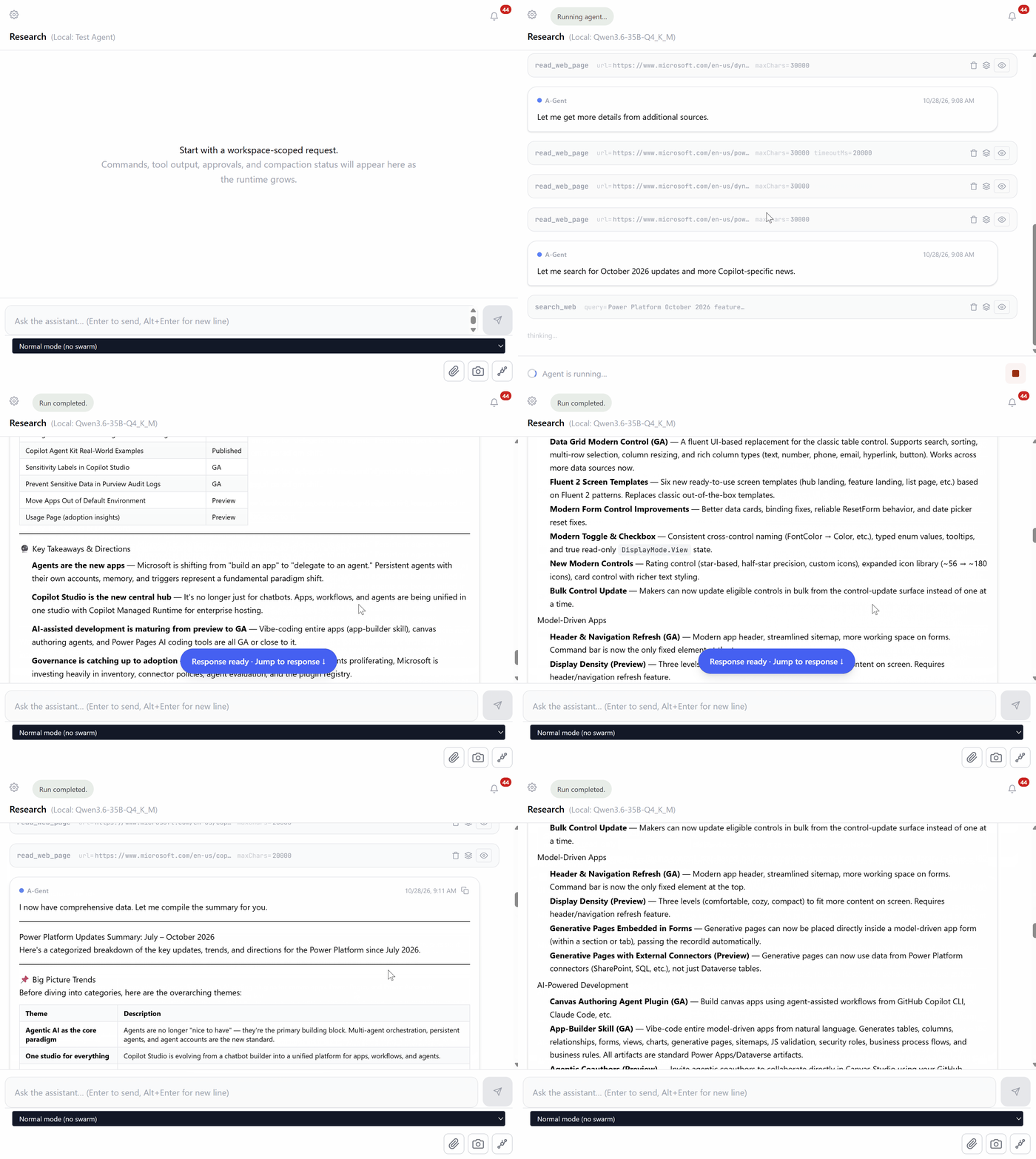
PS. Here is the outcome of that run for those interested in it (apparently my blog can’t render markup text properly right now):
# Power Platform Updates Summary: July – October 2026
Here’s a categorized breakdown of the key updates, trends, and directions for the Power Platform since July 2026.
—
## 📌 Big Picture Trends
Before diving into categories, here are the overarching themes:
| Theme | Description |
|——-|————-|
| **Agentic AI as the core paradigm** | Agents are no longer “nice to have” — they’re the primary building block. Multi-agent orchestration, persistent agents, and agent accounts are the new standard. |
| **One studio for everything** | Copilot Studio is evolving from a chatbot builder into a unified platform for apps, workflows, and agents. |
| **AI-assisted development everywhere** | From vibe-coding entire apps to AI coding plugins for canvas apps, Power Pages, and Power Automate — natural language app building is maturing fast. |
| **Governance at scale** | Advanced connector policies, Power Platform inventory with connector-level visibility, and agent evaluation frameworks are addressing enterprise concerns. |
| **Shift to “AI at Work” roadmap** | Starting September 2026, Microsoft moved from monthly feature updates + Release Wave 1 to a unified “AI at Work” roadmap. No standalone October 2026 feature update was published. |
—
## 🟦 Power Apps
### UI & Modern Controls (Major Push)
– **Data Grid Modern Control (GA)** — A fluent UI-based replacement for the classic table control. Supports search, sorting, multi-row selection, column resizing, and rich column types (text, number, phone, email, hyperlink, button). Works across more data sources now.
– **Fluent 2 Screen Templates** — Six new ready-to-use screen templates (hub landing, feature landing, list page, etc.) based on Fluent 2 patterns. Replaces classic out-of-the-box templates.
– **Modern Form Control Improvements** — Better data cards, binding fixes, reliable ResetForm behavior, and date picker reset fixes.
– **Modern Toggle & Checkbox** — Consistent cross-control naming (FontColor → Color, etc.), typed enum values, tooltips, and true read-only `DisplayMode.View` state.
– **New Modern Controls** — Rating control (star-based, half-star precision, custom icons), expanded icon library (~56 → ~180 icons), card control with richer text styling.
– **Bulk Control Update** — Makers can now update eligible controls in bulk from the control-update surface instead of one at a time.
### Model-Driven Apps
– **Header & Navigation Refresh (GA)** — Modern app header, streamlined sitemap, more working space on forms. Command bar is now the only fixed element at the top.
– **Display Density (Preview)** — Three levels (comfortable, cozy, compact) to fit more content on screen. Requires header/navigation refresh feature.
– **Generative Pages Embedded in Forms** — Generative pages can now be placed directly inside a model-driven app form (within a section or tab), passing the recordId automatically.
– **Generative Pages with External Connectors (Preview)** — Generative pages can now use data from Power Platform connectors (SharePoint, SQL, etc.), not just Dataverse tables.
### AI-Powered Development
– **Canvas Authoring Agent Plugin (GA)** — Build canvas apps using agent-assisted workflows from GitHub Copilot CLI, Claude Code, etc.
– **App-Builder Skill (GA)** — Vibe-code entire model-driven apps from natural language. Generates tables, columns, relationships, forms, views, charts, generative pages, sitemaps, JS validation, security roles, business process flows, and business rules. All artifacts are standard Power Apps/Dataverse artifacts.
– **Agentic Coauthors (Preview)** — Invite agentic coauthors to collaborate directly in Canvas Studio using your GitHub account.
### Mobile
– **Power Apps Native Mobile Apps (Preview)** — Build standalone iOS/Android apps using React Native, Expo, and TypeScript. AI-guided via natural language description. Supports Dataverse, Power Platform connectors, offline profiles, and distribution to App Store/Google Play.
– **Modern Refreshed Look for Model-Driven Apps on Mobile (Preview)**
### Other Notable Updates
– **Online Mode for Dataverse in Canvas Apps (GA)** — Real-time Dataverse access for offline-first canvas apps.
– **Push Notifications in Custom-Branded Apps (GA)**
– **Enhanced Row Summaries in Model-Driven Apps (GA)**
– **Improved Global Search with Table Scoping (Aug 2026)**
– **Dataverse MCP Server (GA)** — Custom APIs now supported, allowing agents to leverage existing custom business logic.
—
## 🟪 Power Automate
### Flow Management & Governance
– **Flow Groups (GA)** — Share process license capacity (or 250,000 actions/day) across up to 25 solution-aware cloud flows. Better capacity utilization for moderate, predictable usage.
– **Server-Side Search** — My Flows search now queries the service, not just the browser-loaded list. Much faster and more complete for large flow inventories.
– **Quick Start Cards** — New home page entry points for common automation scenarios.
– **Power Platform Inventory (Preview)** — Shows connectors and connector operations used by every canvas app, model-driven app, cloud flow, agent flow, and agent. Queryable via admin APIs and Azure Resource Graph.
### AI & Agent Integration
– **Power Automate Plugin for AI Coding Agents** — Available in the Power Platform skills marketplace for GitHub Copilot CLI and Claude Code. Create, edit, run, and debug cloud flows through natural language.
– **Copilot Studio-Powered Actions in Cloud Flows** — Call Copilot Studio agents directly from Power Automate.
– **AI-Assisted UI Automation Repair (Preview)** — Self-healing for desktop flows.
– **Self-Healing (Preview)** — Desktop flows can automatically repair broken UI automation.
### Desktop Flows
– **Version Comparison (GA)** — Side-by-side comparison of desktop flow versions across subflows, actions, variables, UI elements, and images.
– **Run Power App Action (Preview)** — Desktop flows can now launch a Power App directly with a native communication channel, passing inputs/outputs between the two.
### Process Intelligence
– **Export OCPM Semantic Model to Fabric Workspace (Preview)**
– **Ingest Object-Centric Event Log (Preview)**
—
## 🟨 Power Pages
### Security
– **Security Agent (Preview)** — AI-powered assistant in the Power Pages security workspace. Reviews security posture, configures authentication/authorization, manages application security settings, and troubleshoots sign-in issues using natural language. Recommends remediation and always requests approval before making changes.
– **Column Security Profile (Preview)**
– **Enhanced Authorization (Preview)**
### Developer Tooling
– **AI Coding Tools Support (GA)** — Build Power Pages sites faster with GitHub Copilot CLI and Claude Code plugins.
– **Power Pages MCP Server** — Connect to the Power Pages MCP server for agent integration.
– **Copilot Hub for Power Pages** — Centralized agent management for Power Pages.
### Other
– **Manage Exemptions for Power Pages Sites (GA)** — New in September update.
—
## 🟩 Copilot (Copilot Studio & M365 Copilot Integration)
### Multi-Agent Orchestration
– **Multi-Agent Systems (GA)** — Agents can work together across Microsoft Fabric, Microsoft 365 Agents SDK, and open Agent-to-Agent (A2A) protocols.
– **Microsoft Fabric Integration** — Copilot Studio agents can work with Fabric agents to reason over enterprise data and analytics at scale.
– **Microsoft 365 Agents SDK** — Orchestrate Copilot Studio agents alongside agents built for Microsoft 365 experiences.
– **Agent-to-Agent (A2A) Protocol** — Open protocol for universal agent interoperability.
### Persistent & Proactive Agents (October 2026)
– **Agent Accounts** — Agents work in Microsoft 365 with their own credentials. Can be @mentioned in Teams, Outlook, Word, Excel, and PowerPoint. Work with other agents, tools, and apps using approved credentials.
– **Business Process Memory** — Agents carry forward user preferences and business-process context across cycles. Reduces the need to restate context.
– **Triggers in GitHub Copilot Harness** — Agents can be “always on” and triggered by external signals (e.g., email) or scheduled cadences.
– **Agent Refinements (Coming)** — Agents will recommend improvements to makers: converting repeated steps into workflows, capturing reusable skills, suggesting better models.
### Apps in Copilot Studio (Preview)
– **Build Apps in Copilot Studio** — Describe what you want in natural language; Copilot Studio generates a draft app. Apps, workflows, and agents can be combined in one solution.
– **Copilot Managed Runtime (Preview)** — Microsoft-operated hosting, identity, governed data access, lifecycle management, Git-backed versioning, and centralized visibility for apps.
### Evaluation & Governance
– **Expanded Agent Evaluations** — Evaluate both individual AI nodes and broader automations. New metrics: Task Completion, Tool Accuracy, Safety, Latency.
– **Custom Graders Library** — Reusable custom graders across agents and test sets.
– **Evaluation Viewer Role** — Let reviewers see evaluation results without maker permissions.
– **Review Panel (GA)** — Assess agent readiness before publishing. Surfaces blockers, warnings, and organizational policy restrictions.
– **Plugin Registry** — Centralized catalog of 100+ plugins for discovering and governing reusable capabilities across Microsoft Copilot experiences.
### Prompting & Models
– **Immersive Prompt Builder (GA)** — Edit prompts directly in the agent’s Tools tab with model switching, inputs, knowledge, and testing — all in one place.
– **Content Moderation Settings for Prompts (GA)** — Adjust harmful content sensitivity for industries like healthcare, insurance, and law enforcement.
– **Expanded Model Support** — Anthropic Claude Opus 4.6, Claude Sonnet 4.5, Grok 4.1 Fast, GPT-5.3 Thinking, GPT-5.4 Instant (paid experimental preview).
### Customer-Facing Agents (October 2026)
– **Customer Conversation Harness** — New harness for building customer-facing agents connecting voice, chat, business knowledge, and contact data.
### M365 Copilot in Power Apps
– **Microsoft 365 Copilot in Model-Driven Apps (GA)** — Natural-language queries, data summarization, visualization, and cross-Microsoft 365 reasoning via Work IQ.
– **Microsoft 365 Copilot in Canvas Apps (Preview)**
– **Copilot Chat in Model-Driven Apps (Preview)** — Ask questions about in-app data, generate insights, and take actions without leaving the app.
– **App Skills (GA)** — Data entry, exploration, visualization, and summarization skills now generally available.
– **App-Based Form & Grid Experiences in Copilot Chat (GA)** — July 2026.
### Dataverse & Work IQ
– **Work IQ (Preview)** — Now in public preview. Enables Copilot and agents to understand your business data through Dataverse, providing grounded, context-aware responses.
—
## 📊 Governance & Administration
| Feature | Status |
|———|——–|
| Advanced Connector Policies (ACP) | GA |
| Power Platform Inventory (connector-level visibility) | Preview |
| Environment Group Rules Gallery | GA |
| Configure Authentication for Agents | Preview |
| Configure Channel Publishing & Connected Agent Access | Preview |
| Copilot Agent Kit Real-World Examples | Published |
| Sensitivity Labels in Copilot Studio | GA |
| Prevent Sensitive Data in Purview Audit Logs | GA |
| Move Apps Out of Default Environment | Preview |
| Usage Page (adoption insights) | Preview |
—
## 🔮 Key Takeaways & Directions
1. **Agents are the new apps** — Microsoft is shifting from “build an app” to “delegate to an agent.” Persistent agents with their own accounts, memory, and triggers represent a fundamental paradigm shift.
2. **Copilot Studio is the new central hub** — It’s no longer just for chatbots. Apps, workflows, and agents are being unified in one studio with Copilot Managed Runtime for enterprise hosting.
3. **AI-assisted development is maturing from preview to GA** — Vibe-coding entire apps (app-builder skill), canvas authoring agents, and Power Pages AI coding tools are all GA or close to it.
4. **Governance is catching up to adoption** — With thousands of environments and agents proliferating, Microsoft is investing heavily in inventory, connector policies, agent evaluation, and the plugin registry.
5. **Release cadence is changing** — Monthly feature updates ended after September 2026. Microsoft shifted to the unified “AI at Work” roadmap. Expect continuous delivery rather than monthly release notes.
6. **PPCC 2026 (Oct 27-29, Las Vegas)** — The Power Platform Community Conference is the major upcoming event where new capabilities are typically showcased, including the Ignite announcements (Nov 17-20).